Baxter
AR Surgical Training UI
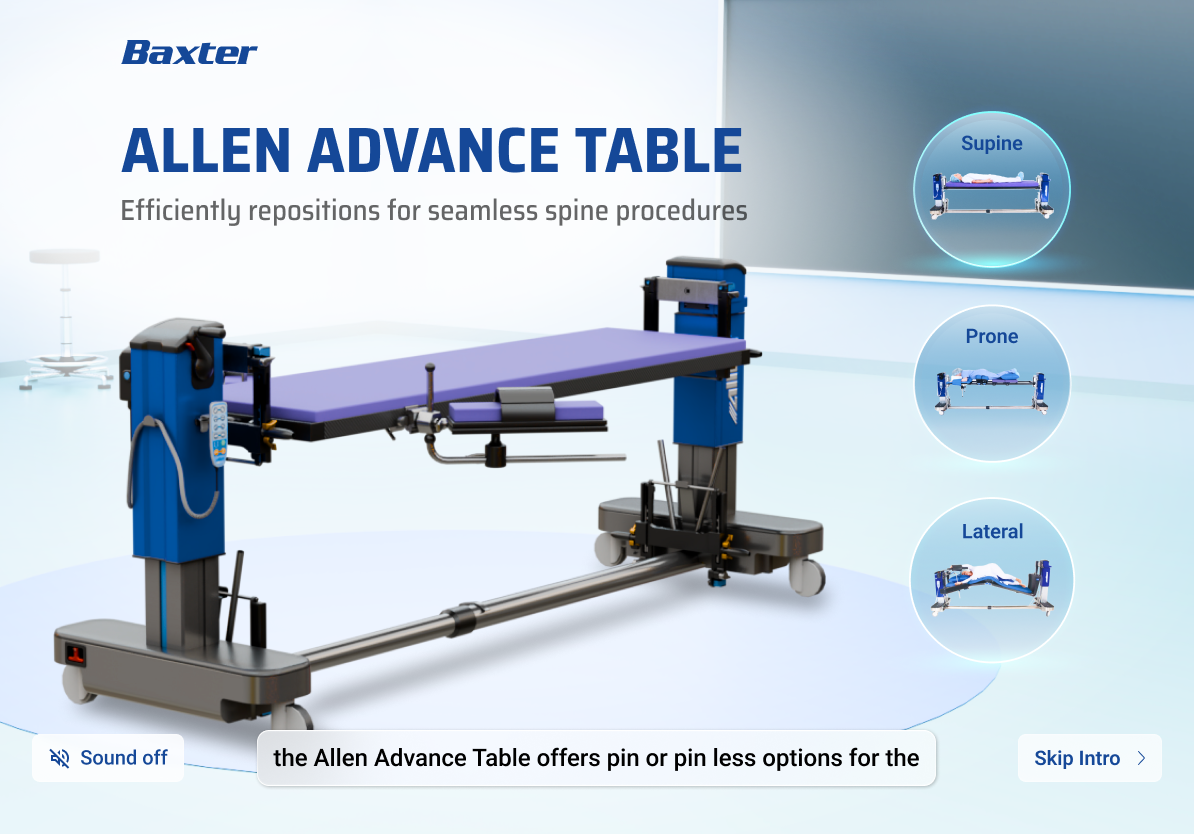
Baxter required an interactive way to demonstrate the Allen Advance Table and its positioning capabilities for spine surgeries. Rather than relying on static brochures and in-person demos, the goal was to provide surgeons with a guided digital training experience that could visually communicate positioning, accessories, weight limits, and procedural workflow in an intuitive AR environment.
UI and interaction design
3D interface layouts
Instructional UI flows
Microinteractions and component states
Visual hierarchy and information architecture
Procedural training for surgical equipment is complex. Position changes, accessory selection, and pressure-management decisions are typically explained verbally or through PDF documents. My task was to translate this into a guided visual format that feels simple, instructional, and surgical-grade.
Build a UI that feels medical-grade and trustworthy
Reduce learning friction with clear step sequences
Surface benefits at the right moment in the workflow
Enable surgeons to safely explore multiple configurations
Maintain Baxter brand language
The visual style references medical imaging systems, clean typography, and calm gradients that help focus attention on the equipment and positioning.
The entire experience is structured around core positioning flows:
Each state updates the UI controls, camera angle, and contextual information allowing surgeons to move step by step through real operating scenarios.
Surgeons can view accessory options and attach them virtually before entering procedure mode. This step includes:
During positioning, the UI introduces point-based clinical benefits including:
Each item highlights directly on the 3D anatomy and table structure to connect benefits to real-world usage.
The interface uses guided arrows, 360 icons, and pop-up labels to help surgeons visually understand:
As surgeons progress, supporting text explains what is happening, why it matters clinically, and how this configuration protects the patient. This helps replace dense brochure content with animated learning.
A separate module allows surgeons to access documents, brochures, catalogs, and product videos. This keeps all relevant information in one place and helps sales teams shorten discussion time.
The experience ends with a medical-grade form that allows hospitals and surgeons to request follow-up. The form was designed with minimal friction and clear hierarchy.
The result is a guided product training experience that helps surgeons visually understand the Allen Advance Table before using it in the operating room. The interface reduces learning complexity and transforms equipment training into an interactive visual walkthrough instead of a technical lecture.